- Accounts
-
Shop
- Bundle / School Shop
- Personal Shop
-
SoundcheckPro
- Getting Started
- Session Mode
- Console Operation
- Audio Effects
- Education
- Advanced Functions
- Troubleshoot
- Xena Mixer
- Yamuka Mixer
- Maggie Mixer
- Zedd Mixer
- DG32 Digital Mixer
- SteeV88
- Audyssey Console
- Xena Web App
- EDU Portal
-
VirtualStudioXR
- Collab-Mode
- Getting Started
- Session Mode
-
WAX
- Getting Started
Hack Panel
- Docs
- WAX
- Getting Started
- Hack Panel
Introduction
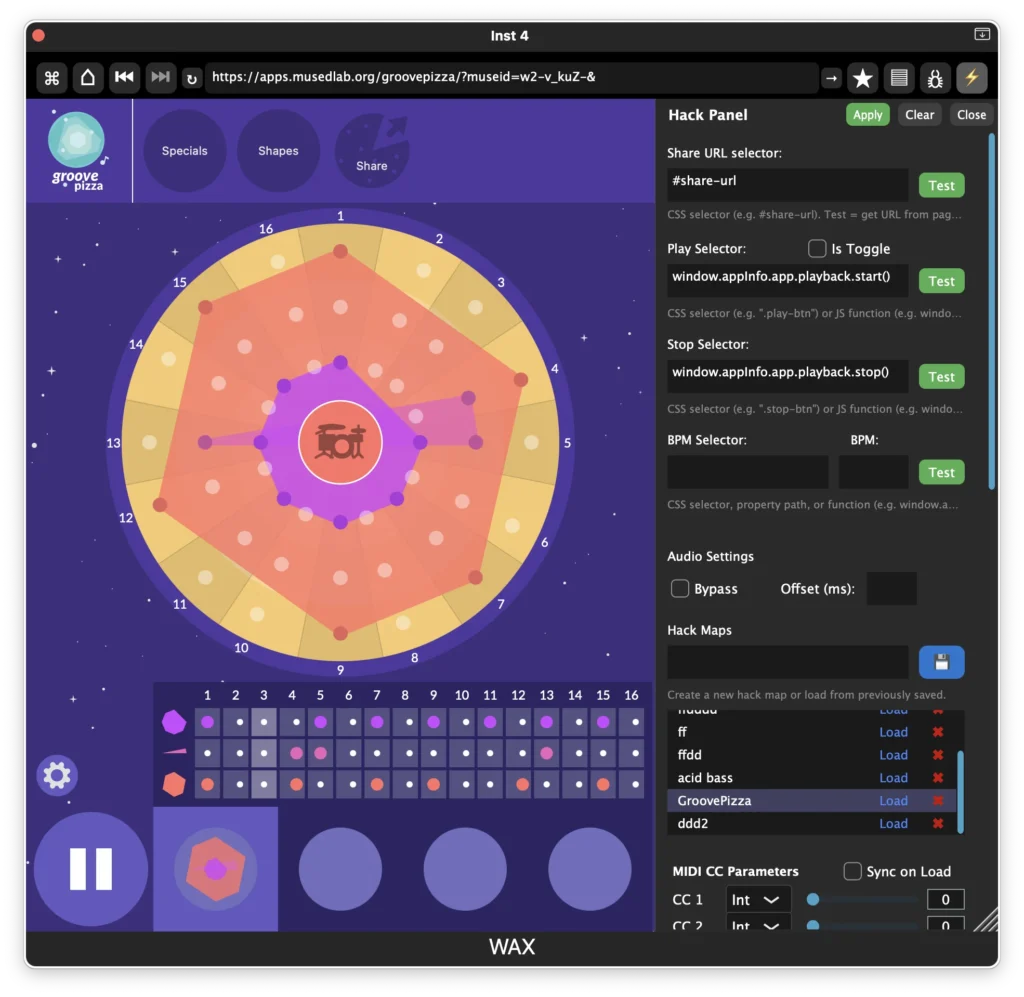
The Hack Panel allows users to create custom integrations between a web app and the DAW environment inside WAX.
Many web apps were not originally designed to run inside a DAW, so the Hack Panel provides tools to connect them to transport, MIDI, and session recall features.
Using the Hack Panel, you can make a web app respond to DAW play/stop, tempo changes, MIDI control, and other host events.
Share URL
The Share URL field stores the live generated URL for the current web app session.
Some web apps encode their state directly in the URL. By capturing this value, WAX can restore the same session later.
This makes it possible to reopen the page exactly as it was when the Hack Map was saved.
Transport Integration
The Hack Panel can connect a web app’s controls to the DAW transport.
You can define functions or CSS selectors that trigger the app’s own play/stop buttons when the DAW starts or stops.
Available controls include:
- Play
- Stop
- BPM
Some apps use the same button for play and stop. In this case, enable Is Toggle so WAX knows the control switches states rather than having separate buttons.
Audio Options
Some web apps generate visuals or analysis but do not pass audio through their output.
The Bypass option allows audio to pass through the plugin dry, while still running the web app. This is useful for visualizers, analyzers, or meters.
You can also set an Audio Offset, which delays playback slightly after the play command is triggered. This helps compensate for apps that take time to start producing sound.
MIDI Control
The Hack Panel includes MIDI CC controls for interacting with web apps.
- CC 1–32 are provided as sliders by default.
- Each control can also be set to Boolean (on/off) if needed.
- MIDI messages above CC 32 are still processed by the system.
The Sync on Load option sends the current slider values to the web app when the page loads. This helps restore parameter states and initialize apps correctly when reopening a session.
Hack Maps
Hack Maps allow you to save and recall Hack Panel configurations.
A Hack Map stores all settings for the current web app, including transport integration, MIDI mappings, offsets, and other panel values.
Saved Hack Maps appear in a list and can be recalled at any time.
Delay Tracer
The Delay Tracer measures how long it takes for a web app to respond to different signals.
It sends test pings for:
- Audio
- MIDI
- Play events
The results help identify internal delays in the web app. These measurements can then be used to fine-tune the audio offset so the app stays in sync with the DAW.